Scan selection filters
Scan selection filters define which scans a module processes or displays. The same filter dialog is reused by data import, processing, export, and visualization modules, although the parameter may be named Scans, Scan filters, Scan selection, or something more specific such as EIC scans.
Info
Scan-selection defaults depend on the module. Some modules start with all scans, while others preselect MS1, MS2, or MSn scans. Always check the value shown in the module dialog.
The scan-filter group can be enabled or disabled. When it is disabled, all scans are selected and the values inside the group are ignored. When enabled, all configured criteria are combined: a scan must satisfy every active criterion to be selected. Leaving an individual field empty does not restrict that property.
Filters
Scan number
Includes scans whose scan numbers fall within the specified inclusive range. Either endpoint may be left empty to create an open-ended selection.
Base Filtering Integer
Selects every _N_th scan, starting with the lower endpoint of Scan number when that range is
set,
or with the first scan number in the raw data file otherwise. For example, N = 3 selects the
starting scan, skips two scans, and then repeats. Use a positive, non-zero integer.
Retention time
Includes scans in the specified inclusive retention-time range, in minutes. The lower endpoint must be non-negative and smaller than the upper endpoint.
Mobility
Includes ion-mobility data in the specified inclusive mobility range. A mobility scan must have a mobility value inside the range. A frame is selected when its mobility range overlaps the configured range. This criterion does not exclude scans that have no mobility dimension.
The mobility unit depends on the acquisition technique and the imported data, for example inverse reduced mobility (1/K0) or drift time in milliseconds.
MS level filter
Selects scans by MS level:
- All MS levels applies no MS-level restriction.
- MS1, level = 1 selects MS1 scans.
- MS2, level = 2 selects MS2 scans.
- MSn, level ≥ 2 selects all fragmentation levels from MS2 upward.
- Specific MS level selects the entered level only.
Scan definition
Matches the scan-definition text stored in the raw data. Matching is case-sensitive and applies to
the complete text. Use * as a wildcard for any sequence of characters; for example, *FTMS*
selects definitions containing FTMS. Scans without a definition do not match a non-empty filter.
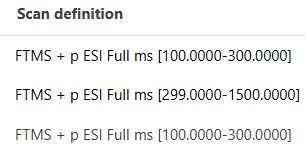
If your acquisition includes multiple, scan ranges (e.g., on an Orbitrap instrument), it is
necessary to process the scan ranges individually. To filter for a specific scan range, set up the
scan definition like this: *100*-300* and *299*-1500*.
Polarity
Selects Any, Positive, or Negative polarity. Any applies no polarity restriction.
Spectrum type
Selects Any, Profile, Centroided, or Thresholded spectra. Any applies no spectrum-type restriction.
Combining filters
Filters narrow the selection cumulatively. For example, selecting MS1, Positive polarity,
and the retention-time range 1.0–10.0 min includes only positive-polarity MS1 scans inside that
time range. It does not include scans that match only one or two of those criteria.
Tip
If no scans are processed or displayed, temporarily clear or disable the scan filters and then add the required criteria back one at a time. Also verify that scan definitions, polarity, and spectrum type were imported as expected.